2027 Budget Planner
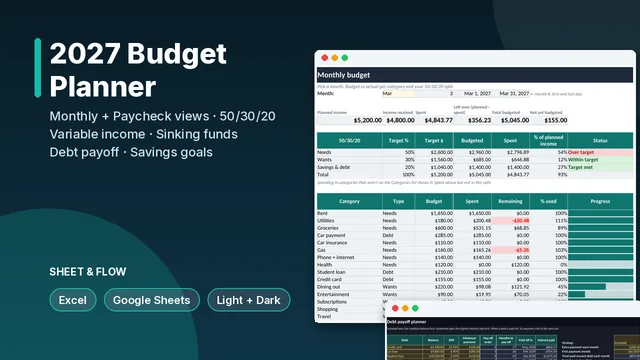
Monthly and per-paycheck budgets, 50/30/20, variable-income mode, sinking funds, debt payoff (snowball or avalanche) and savings goals for 2027.
Plan and track 2027 by month and by paycheck, in Excel or Google Sheets. No macros, nothing to install.
What's inside
- Monthly view: pick a month to see budget vs actual for every category and your 50/30/20 split against target (percentages adjustable).
- Paycheck view: weekly, biweekly, twice-monthly or monthly pay. It lists the bills due before each next payday, shows what's left, and highlights months with an extra paycheck.
- Variable-income mode: for freelancers and commission earners. Tax is set aside first, you pay yourself a steady salary, and the rest goes to a buffer for slow months, with a months-of-buffer status.
- Sinking funds: the monthly amount needed to hit each irregular cost (insurance, holidays, car repairs) by its due date.
- Debt payoff: up to 8 debts, Snowball or Avalanche, extra payments that roll over as debts are paid off, a month-by-month schedule (up to 10 years), payoff dates, total interest and your debt-free date.
- Savings goals: months to go at your current contribution, the monthly amount needed, and On track, Behind or Reached.
- Annual dashboard: income, spending by bucket, net and savings rate month by month, a category-by-month grid against budget, and headline totals.
- Light and dark mode. Transactions (1,500 rows), income (300), categories (40) and bills (40).
In the download
2027-Budget-Planner.xlsx(blank)- Two filled examples: a household with a steady biweekly paycheck, and a freelancer in variable-income mode
- A quick-start PDF guide
Good to know
- Works in Excel 2016 or newer (including Excel for the web) and Google Sheets. Only functions that work in both are used.
- Debt math assumes monthly compounding at APR/12, so your lender's figures may differ slightly.
- A budgeting tool, not financial advice. License: personal use; please don't resell or share the files.
- Built by Sheet & Flow with AI assistance. Every formula was recalculated in LibreOffice and checked against an independent calculation before release (details in the guide).
Refunds: 30-day refund if it doesn't work as described (refund policy).
Learn the method (free)
- Debt Payoff Calculator Spreadsheet: Months to Debt-Free, Total Interest and What an Extra Payment Saves (Excel & Google Sheets)
Work out how many months each debt takes to pay off, the exact interest you'll pay (including the smaller last payment), what an extra payment each month saves, and the payment needed to be debt-free by a target date. Exact formulas, tested in LibreOffice against a month-by-month model.
- Sinking Funds Spreadsheet: Monthly and Per-Paycheck Savings for Irregular Bills (Excel & Google Sheets)
Work out how much to set aside each month and each paycheck for car insurance, holidays, vacations and repairs, count the saving dates and paydays left before each due date, and flag any fund that's behind. Exact formulas, tested in LibreOffice against an independent model.
Save with a bundle
- Holiday + 2027 Budget Bundle
2 products for $14.99 instead of $21.99 (save $7).
Checkout, delivery, receipts and sales tax are handled by Gumroad. Questions after purchase: reply to your Gumroad receipt email. Not tax, legal or financial advice.